

Meet Ankineitor: Automating the Heavy Lifting of Anki Flashcards

If you use Anki, you already know it is practically a superpower for long-term memorization. Spaced repetition is unbeatable, but there is always one massive bottleneck: actually making the cards. Spending hours doing data entry, copying definitions, and formatting text is tedious. That time should be spent actually studying. That is exactly why I built Ankineitor.

I recently open-sourced this project over on my GitHub to help streamline the flashcard creation process, and I want to dive into what it does, why I built it, and how you can use it to supercharge your own learning.

What is Ankineitor?

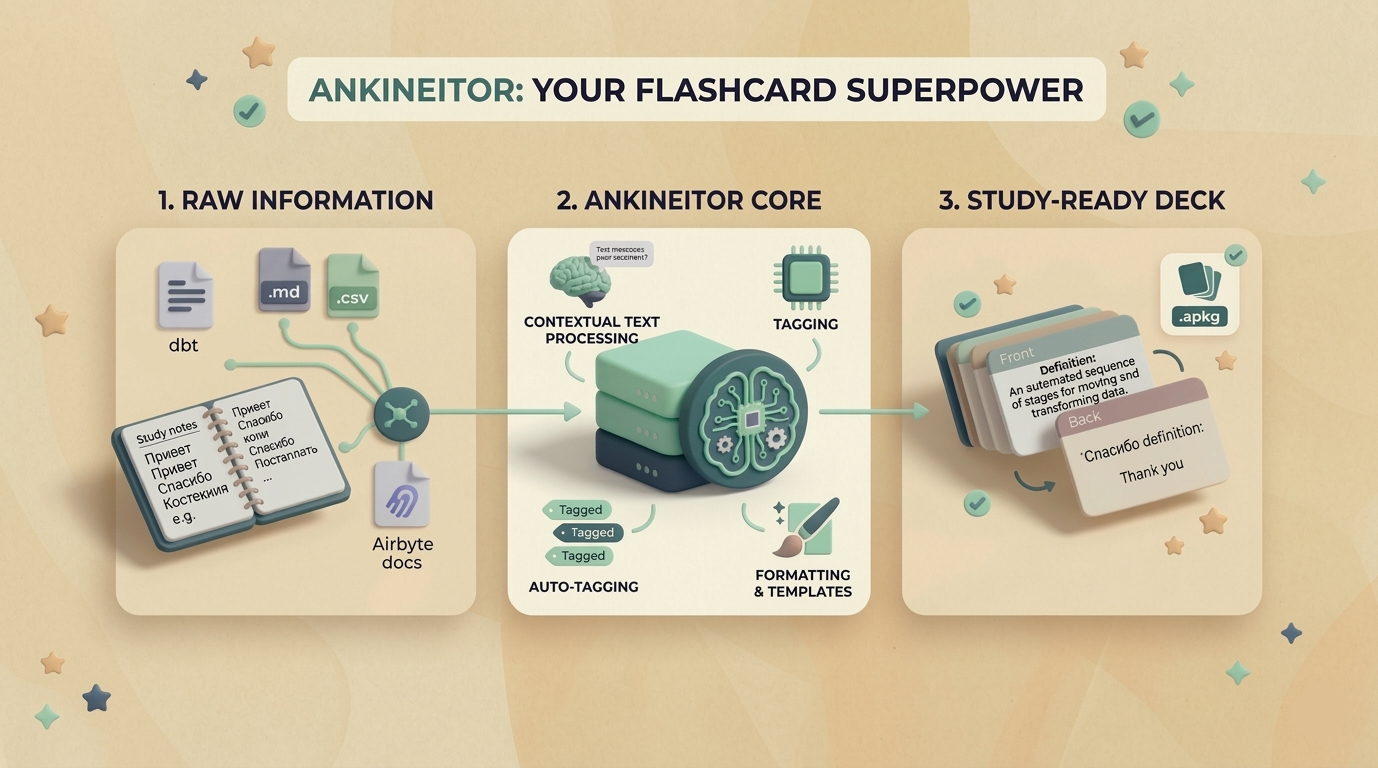
The goal of the project was simple: feed it raw information, and let it handle the formatting, tagging, and structuring required to get that information cleanly into an Anki deck.

Why I Built It (And Who It’s For)

Whether you are trying to master the Russian alphabet, memorize complex artificial intelligence architectures for a university exam, or just keep the syntax of data engineering tools like dbt and Airbyte fresh in your mind, creating good cards is exhausting.

I needed a tool that fit smoothly into a developer’s workflow. Ankineitor is designed for:

  • Language Learners: Quickly generate vocabulary cards without manually looking up every single translation.
  • Students & Engineers: Turn massive blocks of study notes or technical documentation into bite-sized, spaced-repetition questions.
  • Automation Enthusiasts: Anyone who prefers writing a script over doing manual data entry.

How It Works Under the Hood

(foto aqui)

Using Ankineitor is designed to be straightforward. Here is a quick look at the core workflow:

  1. The Input: You provide the raw data. [Explain your input format: e.g., This could be a simple Markdown file, a CSV, or even a direct API pull.]
  2. The Processing: Ankineitor parses the information, [mention any cool technical features, e.g., uses an LLM to generate context / automatically fetches images or audio / applies custom HTML/CSS templates].
  3. The Output: It generates a ready-to-import .apkg file [or syncs directly to your local Anki app via AnkiConnect].

Example Usage

What’s Next for the Project?

Ankineitor is fully functional for my current workflow, but there is always room to grow. In the future, I am planning to add:

  • [Future Feature 1, e.g., Better UI/UX for non-technical users]
  • [Future Feature 2, e.g., Native integration with Notion or Obsidian]
  • [Future Feature 3, e.g., More automated media fetching]

Try It Out and Contribute!

Ankineitor is completely open-source. If you want to stop wasting time creating flashcards and spend more time actually learning, you can grab the code and try it out yourself.

👉 If you find it useful, I’d love it if you left a ⭐️ on the repository. I am also actively welcoming pull requests and issues, so if you have a feature request or spot a bug, let me know!

Leave a Reply

Your email address will not be published. Required fields are marked *

Commonly asked questions and answers

Phone:

+44 7926 690028

Email:

contact@codespact.com

What does your system engineering and consulting involve?

Before writing code, we start with a deep technical diagnosis. We analyze your entire infrastructure, software, and daily operations to identify risks and real opportunities for system improvement.

Based on the initial diagnosis, we design a clear architecture and a realistic technical roadmap. Every single decision considers stability, scalability, and compatibility with your ongoing operations. We never apply generic fixes to complex tech systems.

Finally, we execute structural changes in a controlled and documented manner, strictly aligned with your internal teams. Execution is just a part of the process, not the end. We provide continuous tech support to ensure full platform adoption, smooth continuity, and the absolute capacity for future evolution.

We focus on the complexity of your systems rather than just the size of your company. We partner with organizations that already have running operations but face technical limits due to fast growth.

Often, companies scale their operations rapidly without establishing a solid technical architecture. They end up dealing with accumulated technical debt, unscalable software, or critical infrastructure that is simply too difficult and costly to maintain.

Whether you are a mid-sized team or a large enterprise, our tech interventions are always progressive and highly conscious. We deeply respect your ongoing processes and existing teams. Our main objective is to enable true technical evolution without ever putting your daily operational continuity at risk.

Yes, we frequently intervene in existing platforms that suffer from accumulated technical debt.

Before any intervention, we completely analyze the entire system: your infrastructure, software, and processes. This allows us to spot operational risks and find the safest path to refactor your tech debts.

Our interventions are always progressive and highly conscious. We redesign the architecture and implement structural improvements without ever risking your daily operational continuity.

We never rely on generic tools. Our tech stack is chosen based on your specific system needs. We utilize cloud infrastructure, robust software frameworks, and automated deployments to ensure solid stability.

We build robust backend architectures with Python and Laravel, and scalable applications using React Native. Our cloud infrastructure is strictly powered by Docker, Kubernetes, and GCP to ensure high availability.

For complex data and AI, we leverage TensorFlow and NLP models. Every tool is implemented with strict operational control and continuous support.

Yes, we do. In codesPACT, execution is merely a part of the process, not the end. We provide continuous tech support to ensure your systems evolve with absolute stability, proper control, and a clear technical direction long after the initial deployment phases.

We accompany the transition to assure full adoption, continuity, and future evolution capacity. We do not just deliver the system; we make sure that your internal teams operate it securely.

This approach allows real improvements without generating unnecessary dependencies. Our ongoing role is to act as your technical partner for strategic decisions.

Newsletter subscribe!

Enter your email to unlock our exclusive IT insights on professional systems architecture tailored to your business needs.

Have tech questions?

Let’s schedule a short call to discuss how we can work together and contribute to the stability of your tech ecosystem.